
Watching SoundSwitch live in the visualizer (Art-Net)
The 3D visualizer shows in real time what SoundSwitch sends to your lights. SoundSwitch sends its DMX values via Art-Net to the visualizer on the same computer. That way you can check Autoloops, song shows and looks without setting up your lights.
Step by step
- Under “Project” at the top, choose the same project that is open in SoundSwitch. By default it shows the project SoundSwitch opened last.
- Tap the sun button at the top right of the 3D view, then “SoundSwitch”.
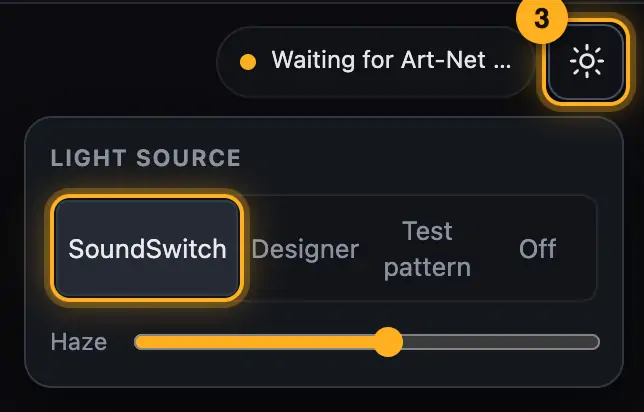
Set the source to SoundSwitch. - In SoundSwitch, open the preferences and go to the “Hardware” tab (depending on the SoundSwitch version the section may be called “DMX & Art-Net”).
- Turn on “Enable Art-Net” and “Localhost Art-Net Node”.
- Play an Autoloop or a song in SoundSwitch. The lights in the visualizer move along.
- The top right of the 3D view now shows e.g. “Art-Net · 70 packets/s · U1”. U1 and U2 are the DMX universes that arrive.
Good to know
- In the web version (also on Windows) you additionally need the small Art-Net bridge, because the browser can’t receive Art-Net by itself. See Art-Net bridge.
- The visualizer only reads. It changes nothing in SoundSwitch or your project.
- “Test pattern” checks the display without SoundSwitch. “Designer” shows the preview from Droplit.
- In edit mode the work light is on by default. You then see the fixtures without the light show. Switch to “Show light” to see the show.
- How to play new shows in SoundSwitch is described in Checking an Autoloop in SoundSwitch.
Questions
Does the visualizer disturb SoundSwitch or my real lights?
No. SoundSwitch sends the values to the visualizer in addition. Your lights keep getting the same signal.
Why does the show look different in the visualizer than in Droplit?
Here you see the real values from SoundSwitch. See Why the preview can look different.
If something goes wrong
- “Waiting for Art-Net …” and after a few seconds “No data from SoundSwitch yet”: check both switches in SoundSwitch and whether something is playing there. After restarting the visualizer, turn “Enable Art-Net” off and on once.
- “Art-Net port 6454 in use”: another program is already receiving Art-Net.
- The lights move but don’t match the show: a different project is selected at the top than in SoundSwitch.
More from “SoundSwitch & export”
- Where Droplit saves“Save to SoundSwitch” writes your show to exactly the slot you picked. Droplit never touches your original project: the first time you save, it makes a copy and works there from then on.free to read
- Opening the project in SoundSwitchAfter saving, your show is in the copy “<project Show-Designer”. To see it in SoundSwitch, open exactly that project there.free to read
- Checking an Autoloop in SoundSwitchA saved Autoloop sits in SoundSwitch in the bank slot you picked in Droplit. Here is how to find and check it.free to read
- Checking a static look in SoundSwitchA saved static look sits in SoundSwitch’s Performance mode, in the bank and slot Droplit named when you saved.free to read
- Checking a song show in SoundSwitchDroplit writes a song show into the song’s script. In SoundSwitch it plays automatically as soon as you load the song.free to read