
Managing preview links
All folders you created in the Studio with “Share preview” are managed on your account page. There you see likes and comments, reply to your guests, extend links or withdraw them.
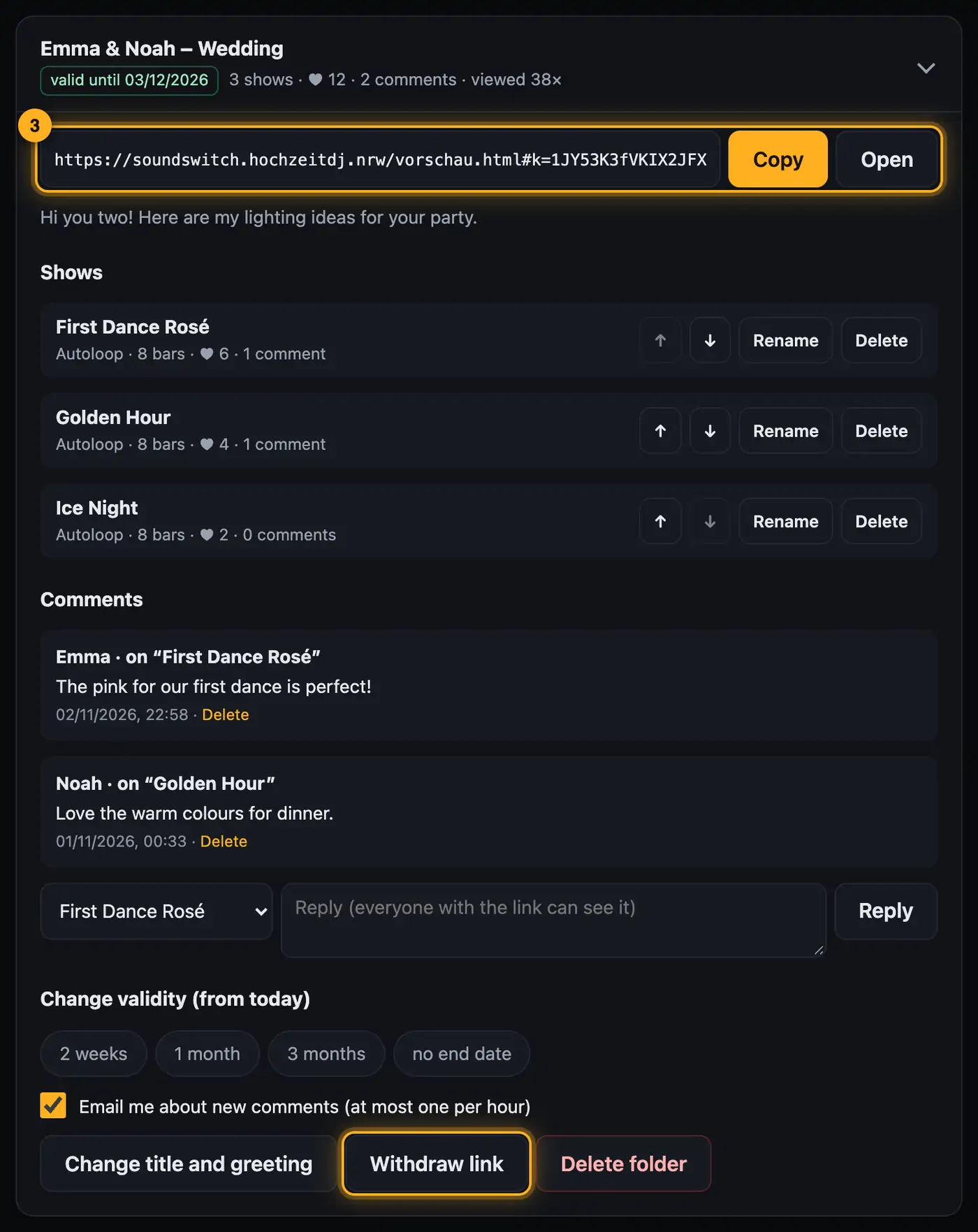
Step by step
- Open your account page and choose the “Preview links” area. Each folder is one row with its title, status (for example “valid until …”), number of shows, likes, comments and how often it was viewed.
- Tap a folder to expand it.
- The link is at the top. “Copy” puts it on the clipboard, “Open” shows the folder the way the guest sees it.
- Under “Shows” you change the order with ↑ and ↓. “Rename” gives a show a new name, “Delete” removes it from the folder together with its likes and comments.
- Under “Comments” you see your guests' comments, newest first. To reply, choose the show, type into the “Reply (everyone with the link can see it)” field and tap “Reply”. “Delete” below a comment removes it.
- Under “Change validity (from today)” choose 2 weeks, 1 month, 3 months or “no end date”. The time counts from today.
- “Change title and greeting” lets you edit the title, the sender and the greeting. Then tap “Save”.
Withdrawing and making a link available again
- “Withdraw link” blocks the folder right away. Instead of the shows, guests see “This preview has been withdrawn.” Likes and comments stay with you.
- “Make available again” makes the same link work again.
- If a link has expired, you see “Make available again for”. Choose a new duration and the old link works again.
- “Delete folder” permanently deletes the folder with all shows, likes and comments.
Good to know
- The “Email me about new comments (at most one per hour)” checkbox applies per folder.
- Everyone with the link can see your replies. They're marked “Reply”.
- At the very bottom you see how much storage your previews use. In total you have 30 MB, up to 20 folders and up to 12 shows per folder.
- We automatically delete expired or withdrawn folders after 6 months.
- You don't add new shows here but in the Studio with “Share preview” (see Share preview).
- New comments and likes also show up in your overview under “New for you”.
Questions
How do I change a show that's already in the folder?
Open it in the Studio, change it and share it again into the same folder with “replace” ticked. Likes and comments stay.
Can I edit a comment?
No, only delete it. If needed, write a new reply.
What happens to the links if I delete my account?
All folders are deleted too, and the links stop working (see Deleting your account).
If something goes wrong
- “No preview links yet. …”: You haven't created a folder yet. Open a show in the Studio and tap “Share preview”.
- “The link has expired – please choose a new duration.”: An expired link can't simply be made available again. Choose a duration under “Make available again for”.
- “You already have as many folders as your account allows. Delete an old one first.”: Delete a folder you no longer need.
- “This folder already has as many shows as allowed. …”: Delete a show from the folder or create a new folder.
- “The storage for previews is full. Delete old folders or shows.”: Song shows take up the most space. Delete old folders or single shows.
- The area shows “Please sign in”: Your session has expired. Sign in again.
More from “Account & data”
- Creating an account and confirming your emailFor the web version you need a free account. You create it with your email address and confirm the address via a link.free to read
- Your overview: what matters at a glanceThe overview is your home page after signing in. At a glance it shows what's new, how far you've come and which shows you've built – and one button takes you back into the designer.free to read
- Plan and AI requestsEvery AI request on the website costs real money. That's why every account has a plan, and the plan decides how many AI requests you can make.free to read
- Signing in and outYou sign in on the website with your account. Your overview then opens, and from there one click takes you into the designer.free to read
- Forgot your passwordIf you've forgotten your password, the website sends you a link to set a new one.free to read