
Help assistant and AI help
The help assistant answers your questions right away from our guides. If that's not enough, ask the AI help or send us your question.
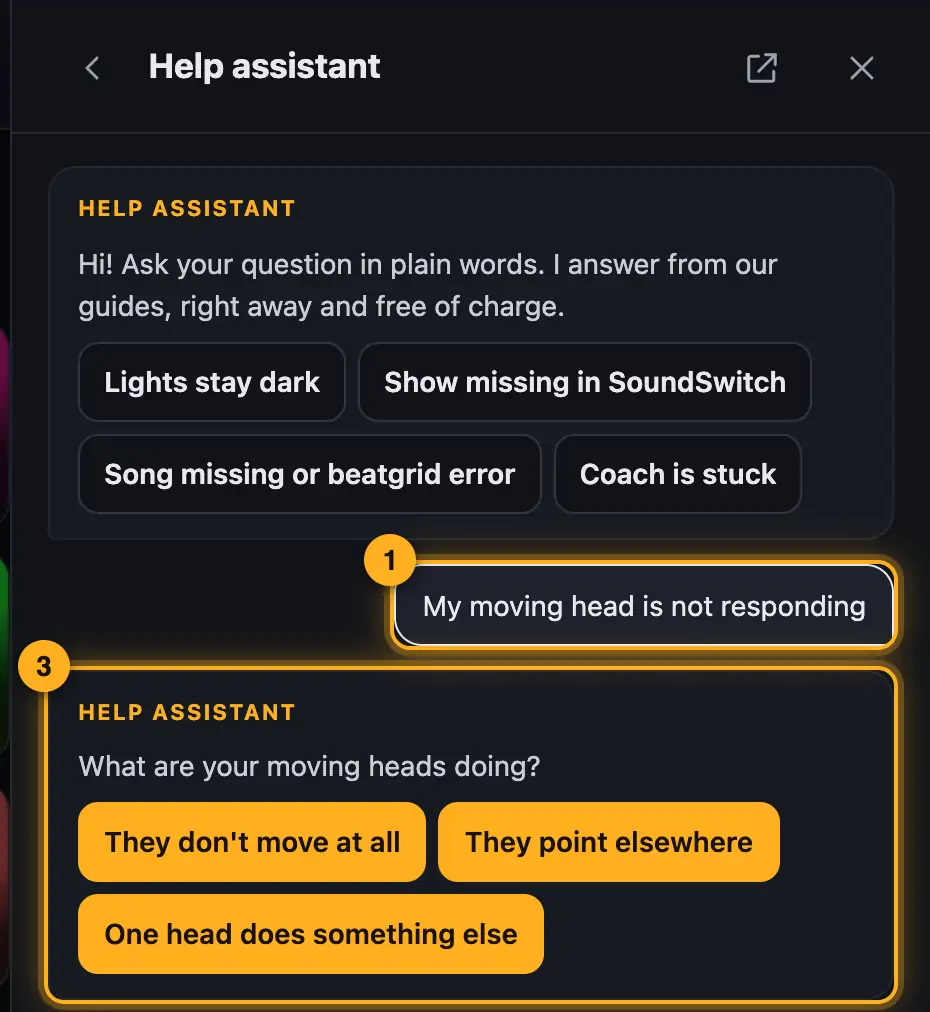
Step by step
- Ask in your own words, for example “My moving head isn't responding”. Or tap one of the suggestions. They match the page you're on.
- The assistant shows the matching answer. “Full guide” opens the complete article.
- For some problems it walks you to the fix with buttons, one step at a time.
- If the answer doesn't fit, tap thumbs down. You get other suggestions and the next options: “Ask the AI” or “Send us the question”.
Assistant and AI help compared
- Help assistant: It works with fixed text blocks from our guides, answers right away, is free and needs no account. Your question is only compared in your browser. If you agreed to usage statistics, we count it like a help search, so we can see which guides are missing.
- AI help: It also understands freely worded and combined questions and takes the conversation so far into account. It only starts when you tap “Ask the AI”, and it needs an account. Its knowledge comes from the same help.
Good to know
- For AI help, each rank has its own quota of AI questions, separate from the AI requests in the Studio. Below each AI answer you can see how many are left (see Rank and AI requests).
- AI can make mistakes. Double-check anything important, especially rigging, power and load. When in doubt, the linked guides apply.
- Don't put personal data in your question. We don't store the text of AI questions.
- If the interface has just shown a message, the assistant offers you a button for it.
Questions
Is the help assistant an AI?
No. It compares your question with our text blocks. AI help is a separate step you tap yourself.
Can I talk to a human?
Yes. Tap “Send us the question” or . We'll reply by email.
Why don't I see “Ask the AI”?
AI help needs an account on the website, and you need AI questions left.
If something goes wrong
- “You've used all your AI questions this month.”: They come back on the 1st of next month. The help assistant with the guides stays free.
- The assistant doesn't understand you: Keep it short and name the fixture or the place, for example “Tubes stay dark in the Visualizer”.
More from “Feedback & contact”
- Report a bugIf something doesn't work as expected, report it right where it happens, with a screenshot in one click. The report reaches us immediately.free to read
- Marking up and redacting a screenshotA screenshot often says more than a long description. In the feedback panel you capture it with one click, point at the spot with a box or an arrow and redact anything nobody should see.free to read
- Suggest an idea or ask a questionIf something's missing or you can't find an answer in the help, write to us straight from the program. Ideas go onto our list, questions we answer by email.free to read
- My feedback and repliesWith an account you see all your bug reports, ideas and questions in one place, with their status and our reply.free to read