
My feedback and replies
With an account you see all your bug reports, ideas and questions in one place, with their status and our reply.
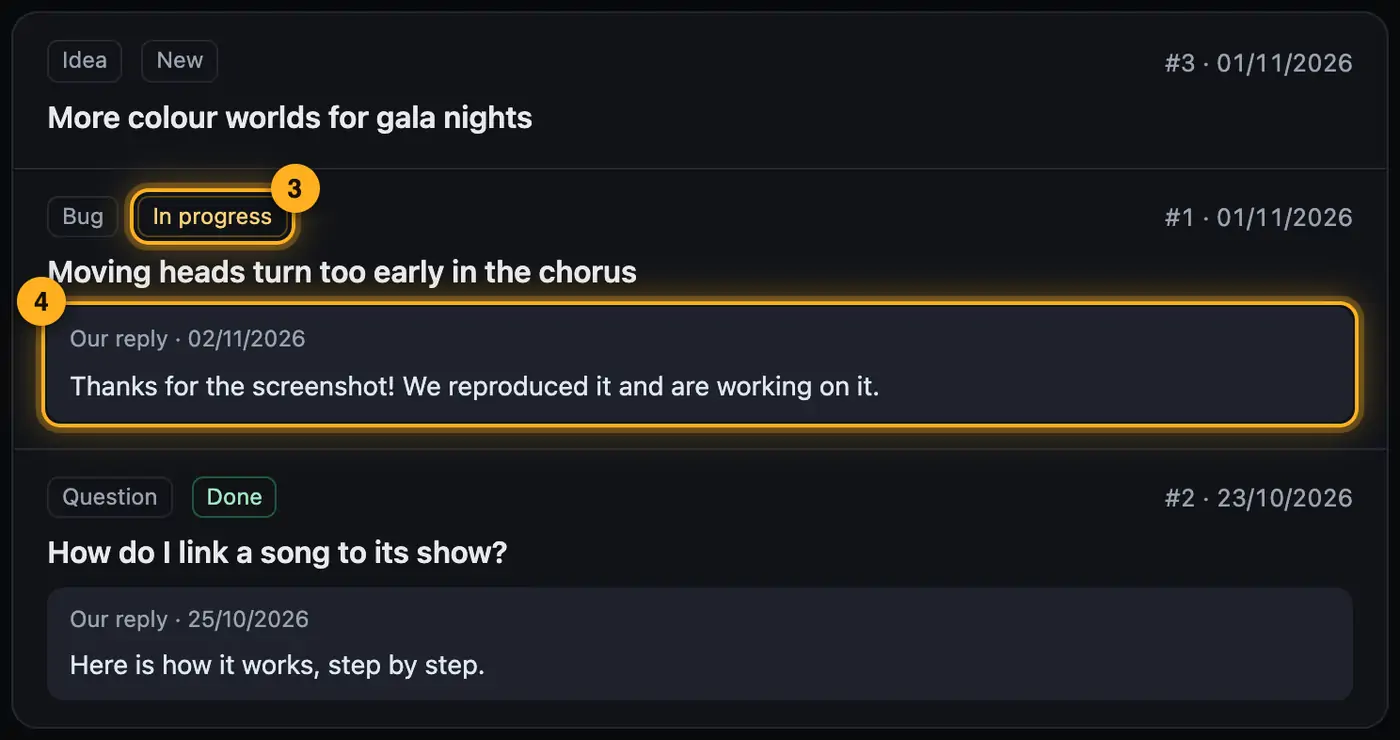
Step by step
- Sign in and open “My account” via the button with your name.
- Choose the “My feedback” area. Each report shows its type, short text, date and status.
- The status is “New”, “In progress” or “Done”.
- Once we've replied, the reply appears right below the report. You also get it by email.
Good to know
- If you delete your account, your reports are deleted too.
Questions
Can I withdraw or change a report?
Just send a new report with a note. We'll combine both.
More from “Feedback & contact”
- Help assistant and AI helpThe help assistant answers your questions right away from our guides. If that's not enough, ask the AI help or send us your question.free to read
- Report a bugIf something doesn't work as expected, report it right where it happens, with a screenshot in one click. The report reaches us immediately.free to read
- Marking up and redacting a screenshotA screenshot often says more than a long description. In the feedback panel you capture it with one click, point at the spot with a box or an arrow and redact anything nobody should see.free to read
- Suggest an idea or ask a questionIf something's missing or you can't find an answer in the help, write to us straight from the program. Ideas go onto our list, questions we answer by email.free to read