
The community: questions, answers and shows
In the community, DJs help each other: you ask questions, answer others and show your shows. Others see them in 3D and can use them on their own lights with one click. The community is for signed-in users only.
Step by step
- Open the community. You can read everything right away.
- To ask, answer or show a show, choose your community name once and confirm the rules. Others see this name, never your email address.
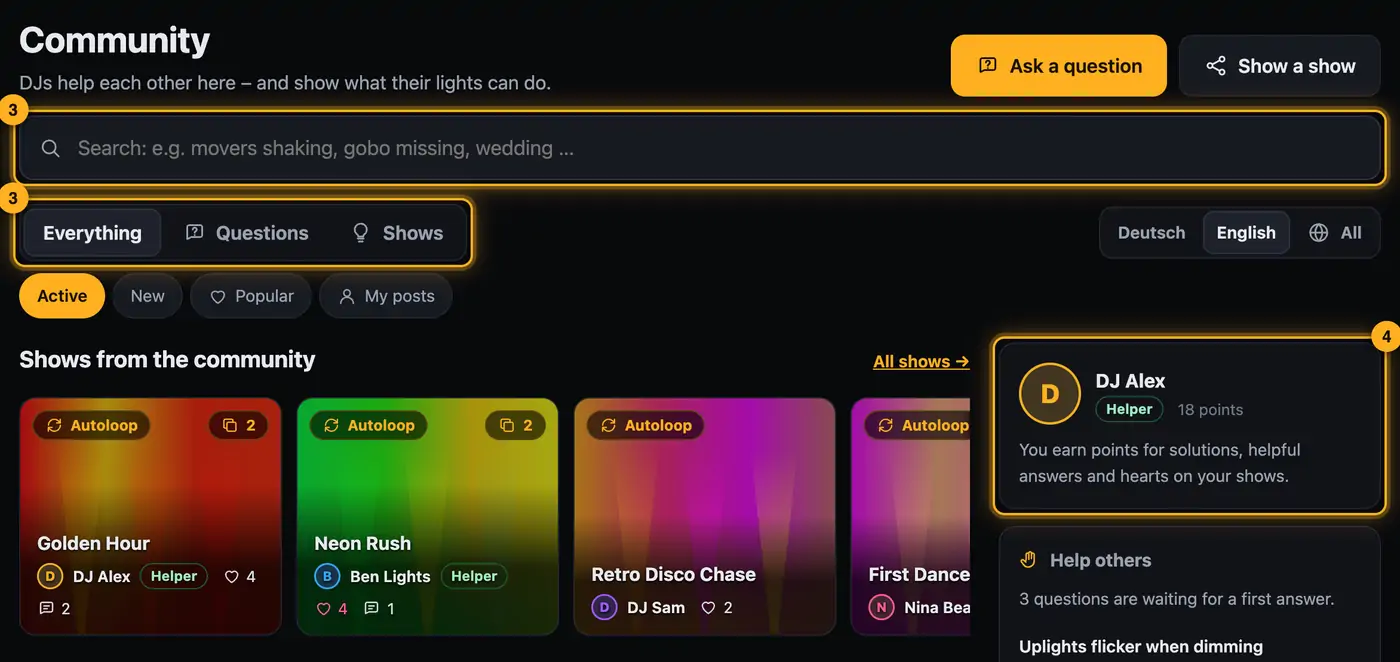
- At the top, choose Everything, Questions or Shows. The search field searches questions, answers and shows.
- On the right you see your profile with points, questions still waiting for an answer, and the top helpers.
Searching and filtering
- The search field at the top searches questions, answers and shows. Solved questions appear first in the results. If nothing turns up, try other words or All languages.
- Everything shows a strip of shows at the top and the questions below. You can sort by Active (latest activity), New or Popular. My posts shows only your own questions and shows and everything you've answered or commented on.
- Under Questions you filter by Unanswered (no answer yet), Open (not solved yet), Solved, Mine (asked or answered by you) and Following. Next to them, the topic buttons narrow things down, for example Movers & positions or SoundSwitch & saving.
- Under Shows you sort by Active, New or Popular and pick an occasion, for example Wedding, Club or Corporate event.
- Tapping a filter a second time turns it off again. At the end of the list, Load more loads further posts.
- Tapping a show opens it in 3D (see Viewing a show in the community).
Good to know
- Posts carry a language tag (DE or EN). At the top right, choose Deutsch, English or All.
- You earn points for an answer marked as the solution (15), every “Helpful” (3), every heart on your show (2) and every time someone uses your show (5). From 10 points you're a Helper, from 50 a Light pro, from 200 a Legend.
- Badges like “First solution” or “Showmaker” appear on your profile page (see Community profile and badges). Answers from the team carry the Team badge.
- You'll find the rules at the bottom of every community page under Community rules.
Questions
Who sees what I write?
All signed-in users, with your community name. Guests without an account see nothing.
Can I change my name?
Yes: open your profile (tap your name on the right) → Edit profile (see Community profile and badges).
What happens if I delete my account?
Your profile, posts, answers, images and votes are deleted too.
More from “Community”
- Ask the community a questionStuck? Ask the other DJs. While you type, the community already shows solved questions and matching guides – often the answer is already there.free to read
- Help others and earn pointsYou know your way around? Then help others – every idea moves someone forward. Good answers earn points, levels and badges.free to read
- Viewing a show in the communityEvery show in the community runs in a 3D preview, just as it looks for its creator. Next to it you see which lights it was built for and whether it fits your rig.free to read
- Use a show from the community on your lightsLike a show from the community? Add it to your designer with one click. The designer adapts it to your fixtures – you see it in 3D right away.free to read
- Show a show in the communityShow your best shows: others see them in 3D, give hearts, comment – and can use them on their own lights.free to read