
Ask the community a question
Stuck? Ask the other DJs. While you type, the community already shows solved questions and matching guides – often the answer is already there.
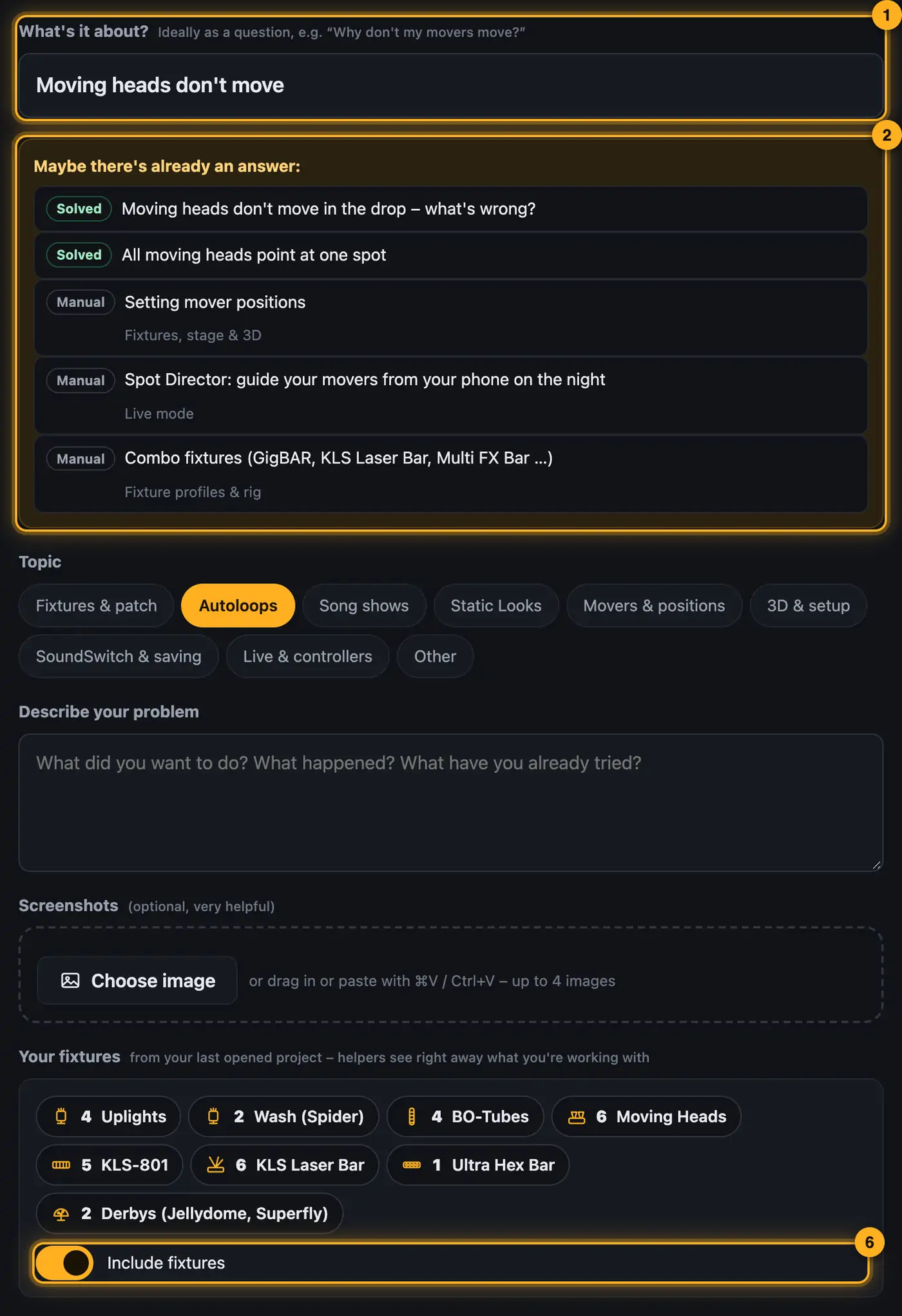
Step by step
- Under What's it about? describe your problem in one sentence, ideally as a question.
- Look at the suggestions under Maybe there's already an answer. Solved questions are marked green.
- Choose a Topic, for example “Movers & positions”.
- Describe what you wanted to do, what happened and what you've already tried.
- Feel free to attach Screenshots: choose them, drag them in or paste with ⌘V / Ctrl+V, up to four images.
- Your fixtures shows what you're working with. With Include fixtures you decide whether it's added.
- Tap Post question.
Good to know
- The community takes the fixture card from the project you last opened in the designer, so open your project first.
- You automatically follow your question. When someone answers, you see it at the bell and get at most one email per hour.
- If an answer helped, tap This helped – mark as solution below it. That way others find the solution and the helper earns points.
- With Me too you show that you have the same problem.
- Bugs in Droplit itself are best reported to the team: Help → .
Questions
Can I change my question?
Yes, with Edit below the question. You can delete it there too.
I don't want emails.
Open your profile → Edit profile → untick “Email me when someone answers”.
More from “Community”
- The community: questions, answers and showsIn the community, DJs help each other: you ask questions, answer others and show your shows. Others see them in 3D and can use them on their own lights with one click. The community is for signed-in users only.free to read
- Help others and earn pointsYou know your way around? Then help others – every idea moves someone forward. Good answers earn points, levels and badges.free to read
- Viewing a show in the communityEvery show in the community runs in a 3D preview, just as it looks for its creator. Next to it you see which lights it was built for and whether it fits your rig.free to read
- Use a show from the community on your lightsLike a show from the community? Add it to your designer with one click. The designer adapts it to your fixtures – you see it in 3D right away.free to read
- Show a show in the communityShow your best shows: others see them in 3D, give hearts, comment – and can use them on their own lights.free to read