
Notifications, following and reporting
The bell shows what happened in the community for you. With Follow you stay on top of questions, with Report you help keep the community clean.
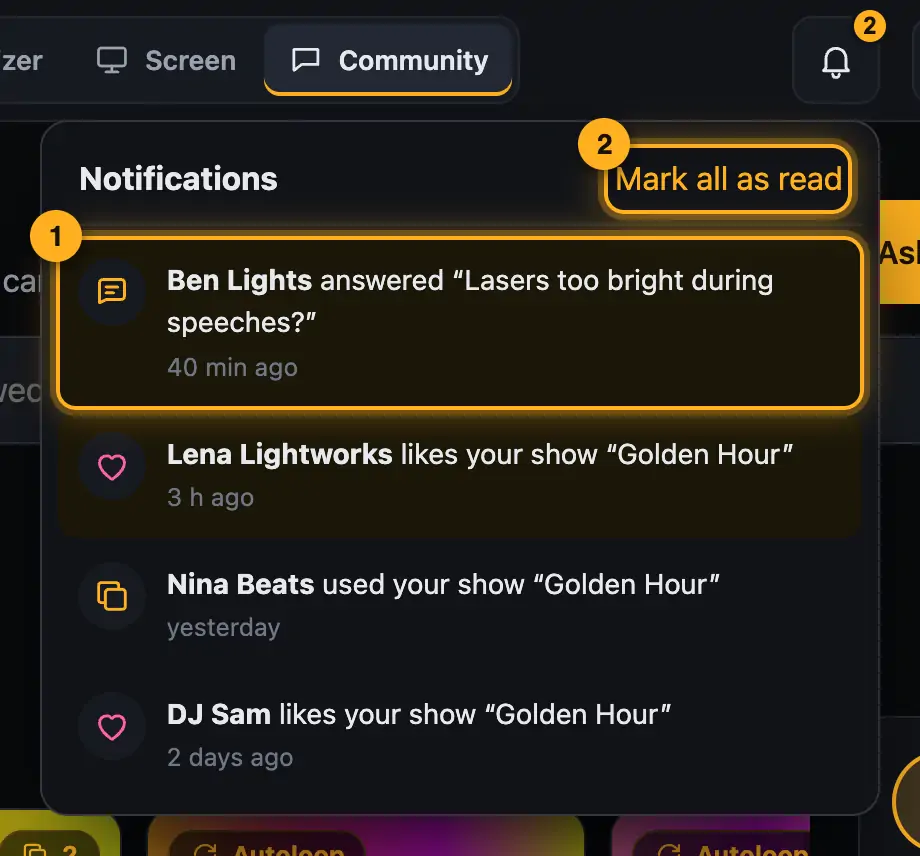
Step by step
- Tap the bell. New entries are highlighted, a tap opens the post.
- Mark all as read marks everything as read.
- Follow below a question: you're notified when someone answers. You automatically follow your own questions and questions you answered.
- If something doesn't belong here, tap Report, choose a reason and send the report.
Good to know
- Emails come as a summary, at most one per hour, and only for what you haven't read yet. Turn them off: profile → Edit profile.
- After three reports a post is hidden automatically until the team has checked it.
- Anyone who doesn't follow the rules can be blocked from posting. Reading still works.
More from “Community”
- The community: questions, answers and showsIn the community, DJs help each other: you ask questions, answer others and show your shows. Others see them in 3D and can use them on their own lights with one click. The community is for signed-in users only.free to read
- Ask the community a questionStuck? Ask the other DJs. While you type, the community already shows solved questions and matching guides – often the answer is already there.free to read
- Help others and earn pointsYou know your way around? Then help others – every idea moves someone forward. Good answers earn points, levels and badges.free to read
- Viewing a show in the communityEvery show in the community runs in a 3D preview, just as it looks for its creator. Next to it you see which lights it was built for and whether it fits your rig.free to read
- Use a show from the community on your lightsLike a show from the community? Add it to your designer with one click. The designer adapts it to your fixtures – you see it in 3D right away.free to read