
Building truss rigs and DJ booths
You can build complete rigs from truss: goalpost, double goalpost, truss arch, box, U shape, roof over the dance floor, circle and crank stands. For the DJ booth you pick one of many builds, from a scrim facade to an LED booth, many of them with a TV at the front. The sizes come from real products.
Step by step
- In “Truss & stands”, click a rig, e.g. “Truss box (cube)” or “Truss circle”. Box and U shape land at the booth, circle and roof over the dance floor.
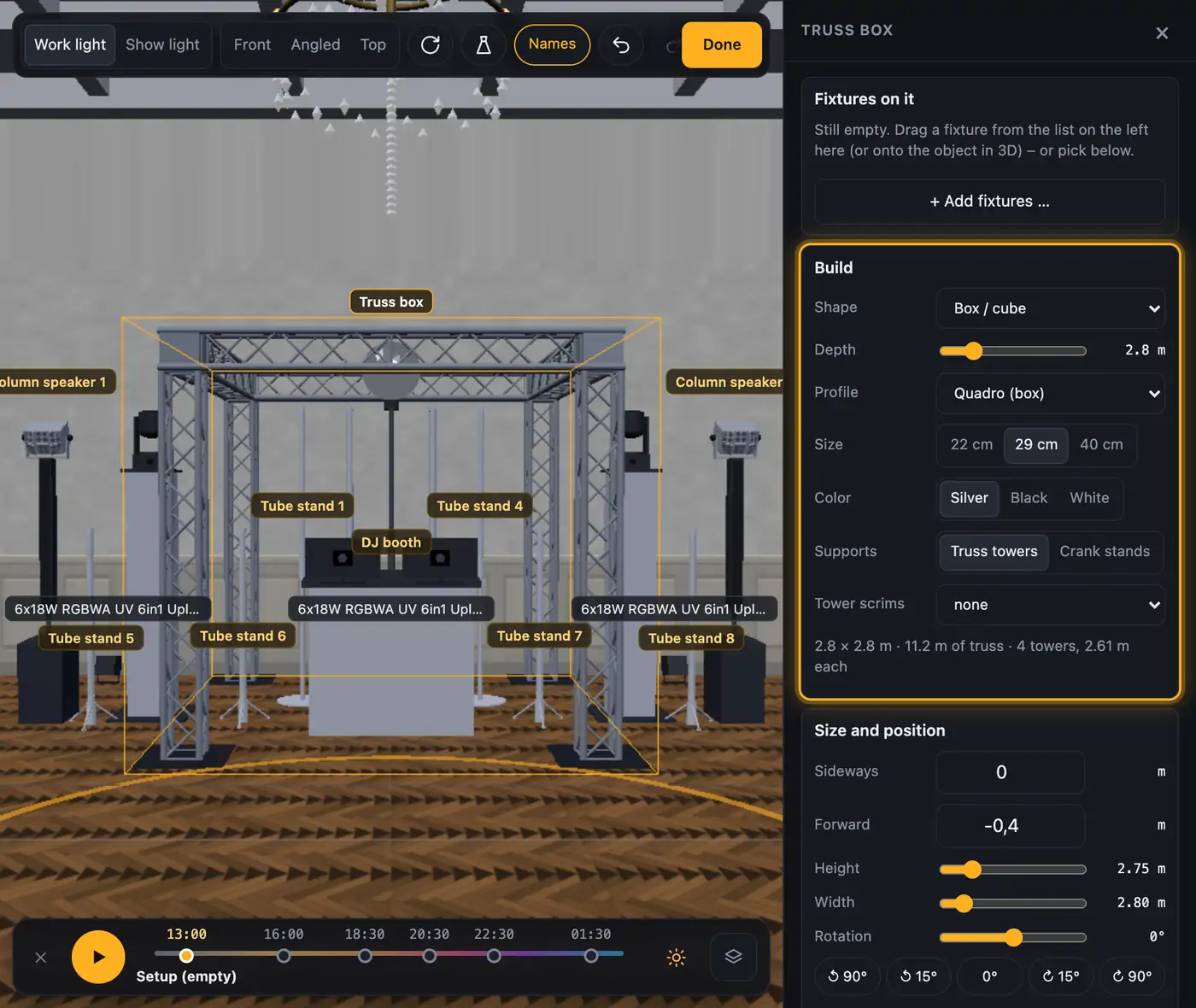
- On the right under “Build” you set:
- “Shape”: goalpost, truss arch, box, U shape, roof, circle or curved (top view),
- “Center leg” for the goalpost: “none” or “with (double goalpost)” for a third leg in the middle,
- “Arch top” for the truss arch: “angled (5 sides)” or “round”,
- “Depth” for box, U shape, roof and curved truss,
- “Profile” (duo, trio, quadro), “Size” (22, 29 or 40 cm) and “Color” (silver, black, white),
- “Supports” (not for the truss arch): truss towers or crank stands, for the circle “4 truss towers” or “flown (chain hoists)”,
- “Tower scrims”: white or black scrim.
- Under “Size and position” you set height, width (“Diameter” for the circle) and rotation.
- Hang your fixtures on it: drag them onto the rig in 3D, they snap anywhere along it. Or use “+ Add fixtures …” under “Fixtures on it” to pick several – they spread evenly all around.
- For the booth, click a build in “DJ booths”. Your booth changes, the fixtures on it stay. For a second booth, drag the block into the 3D view.
- Click the booth. Under “Build”, change the build with “Model” and set the options that model has:
- “Scrim” (white or black) for the compact booth, DJ booth with top shelf, folding booth with TV column, panel facade, curved booth and truss booth,
- “Frame color” for the compact booth, DJ booth with top shelf, folding booth with TV column, panel facade, curved booth and ULTIMAX TrussBooth, “Truss color” for the truss booth,
- “Side panels” (90°, 45° or none) for the panel facade,
- “TV at the front” (none or a size that fits the booth) for the compact booth, DJ booth with top shelf, folding booth with TV column, truss booth, Equinox Event Booth, ULTIMAX TrussBooth and Humpter B3, more on this below,
- for the Humpter B3 also “Variant” (B3 at 93 cm or B3-H at 110 cm), “Side modules” (B3 PLUS, 296 cm wide) and “Top front panel”,
- “Color” for the Humpter and Bunn Gear booths, for the Humpter MOVE “Black (BL)” or “Wood (WD)”,
- “Cover” and “Tabletop facade” for the DJ table with cover,
- “LED image” (“Gradient”, “color of the fixtures inside”, “Live like a screen” or “off”) and “Sides” (“LED (270°)” or black) for the LED booth,
- “Front” (black, white, wood or “Acrylic light front”) for the DJ furniture.
More from “Fixtures, stage & 3D”
- The workbench: setting up the visualizer with the toolbar on the leftThe visualizer has a new layout: instead of one long sidebar and lots of buttons at the top, there is a toolbar on the left with seven areas. Only one area is open at a time, and the 3D view stays large next to it. At the top you see which location and which setup are loaded, and the search gets you to any function in two seconds.Summary
- Opening and using the 3D visualizerThe 3D visualizer shows your lights on a virtual stage. You see what SoundSwitch or Droplit is sending to your fixtures right now, and you can rebuild your real setup.Summary
- Fixtures & stage in Droplit“Fixtures & stage” is the full 3D visualizer right inside Droplit. This is where you set up your stage and hide fixtures that your shows shouldn't use.Summary
- Choosing the source: SoundSwitch, Designer or test patternAt the top right of the 3D view you choose where the light values come from. You either watch live what SoundSwitch sends to your fixtures, or the preview from Droplit.Summary
- Fixture details and DMX monitorClick a fixture to see its address, its mode and all channel values live. The DMX monitor adds all 512 channels of a universe at a glance.Summary