
Song listed twice in SoundSwitch: move a show
If a song is in SoundSwitch twice, for example as “Song.wav” and “Song..wav”, a show can easily end up on the entry you never load at the gig. “Move show” copies it to the second entry with one click.
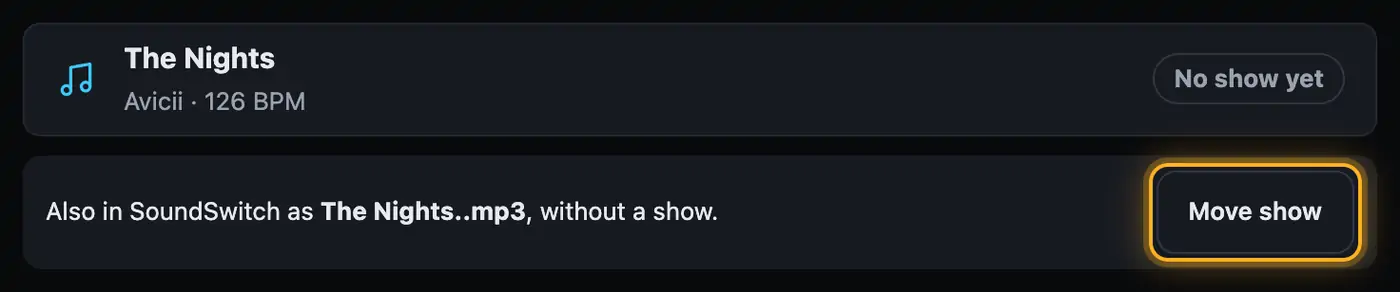
Step by step
- Open the show in Droplit and save it to SoundSwitch once.
- Open Songs on the left. Under the song you’ll see “Also in SoundSwitch as Song..wav, without a show.”.
- Tap “Move show”.
- If you edited a copy, bring the project folder to the SoundSwitch computer as usual. SoundSwitch has to be closed.
- Load the second entry in SoundSwitch.
When does the button appear?
- The two entries differ only in the dots before the file extension.
- The second entry has no show yet.
- Both have the same beatgrid.
- You’re working in a copy. Droplit doesn’t change the original.
Good to know
- An existing show is never overwritten.
- The show also stays on the old entry.
- If the second entry is shorter, the show isn’t shortened. It plays until the song ends and the rest goes unused.
- The song list doesn’t show entries without a show as their own row. You only see them through this note. More in A song is missing from the list.
If something goes wrong
- No button: If both entries already have a show, or the beatgrid differs, Droplit doesn’t offer the move. Load the entry that has your show.
- Show doesn’t appear in SoundSwitch: Close SoundSwitch before copying the folder, and check that you loaded the second entry.
More from “Troubleshooting”
- The folder can’t be sharedIn the web version, Droplit works directly with the folder that holds your SoundSwitch projects. To do that, you share this folder in the browser once. If that fails, it is almost always down to the browser or the wrong folder.free to read
- “Loading the Python core …” is stuckThe web version calculates your shows right in the browser. To do that, it loads a calculation core at startup. While that is running, the top shows “Loading the Python core …”. If it stays there, one of the following steps usually helps.free to read
- A project doesn’t appear in the listThe start page shows all SoundSwitch projects Droplit can find. If one is missing, it usually sits in a different folder or has never been saved in SoundSwitch with lights.free to read
- A song is missing from the listDroplit only shows songs for which SoundSwitch has already created a file in your project. That only happens once you open the song in SoundSwitch and save.free to read
- Saving to SoundSwitch doesn’t work“Save to SoundSwitch” writes your show to the copy of your project. If that fails, Droplit usually tells you exactly why. Here are the most common messages and what you can do.free to read